Make every incident visible, owned, and closed for real.
Intellilox Incident and Actions is the system of record for events and CAPA. Capture the facts, investigate the cause, assign corrective and preventive actions, and prove the change held — in one history.
Report the event, classify severity and outcome, act with an owner and a due date, then verify effectiveness. Frameworks, Form Designer, reporting, and Dashboard Designer sit inside Incident and Actions — they are how you configure the work, not separate products on this site.
CAPTURE · CLASSIFY · ACT
Make the event usable on the first save.
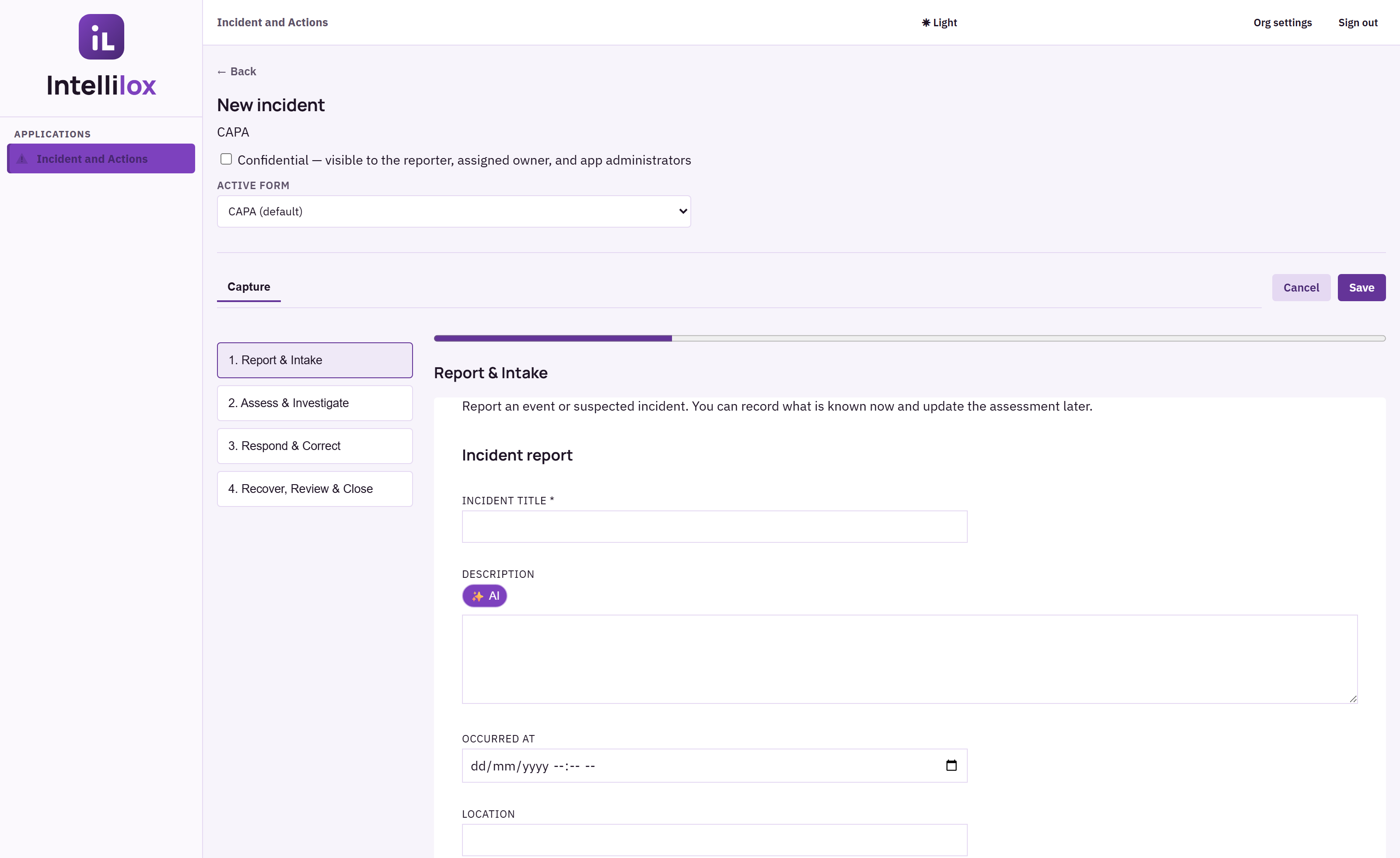
The default CAPA form walks Report & Intake, Assess & Investigate, Respond & Correct, and Recover, Review & Close.
AI-assisted rewrite is available on description and CAPA narrative fields so the record stays accurate under pressure.
Actions inherit the source incident, with owner, due date, priority, and evidence.
PROVE · IMPROVE
Close only when the change held.
Effectiveness review and closure notes stay on the incident, not in a side spreadsheet.
Print one record or an executive safety pack from the register filters you already use.
Workflows & Escalations and duplicate detection keep urgency and recurrence from going quiet.
SIX CONNECTED PHASES
A repeatable path through disruption.
Hover a phase to see how Incident and Actions supports it
Urgent control and durable improvement stay on one incident history. Actions carry the work; the incident keeps the evidence, CAPA narrative, and closure decision together.
ONE CONNECTEDIncident lifecycleCAPA through closure
01PrepareFrameworks + forms
START WITH STRUCTURE
Deploy a framework, then refine the live form so reporters see the fields your operation actually needs.
02Identify & reportIncident capture
CAPTURE THE SIGNAL
Record facts, people, impact, severity, location, attachments, and what is known now — update later without losing the first save.
03Assess & containInvestigation
DECIDE AND CONTROL
Score outcome and contributing factors. Preserve containment and root cause on the same CAPA record.
04ActCorrective actions
OWN THE CHANGE
Create CAPA actions with an owner, due date, priority, and a source link back to the incident.
05Recover & closeEffectiveness
RESTORE AND VERIFY
Effectiveness review and closure notes stay attached. Overdue work escalates instead of disappearing.
06LearnReports + dashboards
SEE THE PATTERN
Executive packs and CAPA dashboards show recurrence, severity, and whether preventive action is actually landing.
THE SAME PRODUCT, CONFIGURED
One Incident and Actions licence. The form your industry needs.
Deploy a framework or publish a Form Designer copy. Health, manufacturing, and construction examples below are live customer-shaped forms — not mockups of other applications.
Captures from Incident and Actions-only organisations: CAPA command centre, the default CAPA form with AI-assisted fields, the incident register, linked actions, and industry forms for health and manufacturing. Form Designer, Dashboard Designer, and Report Designer are described below — their authoring screens are not shown.
01 / 06
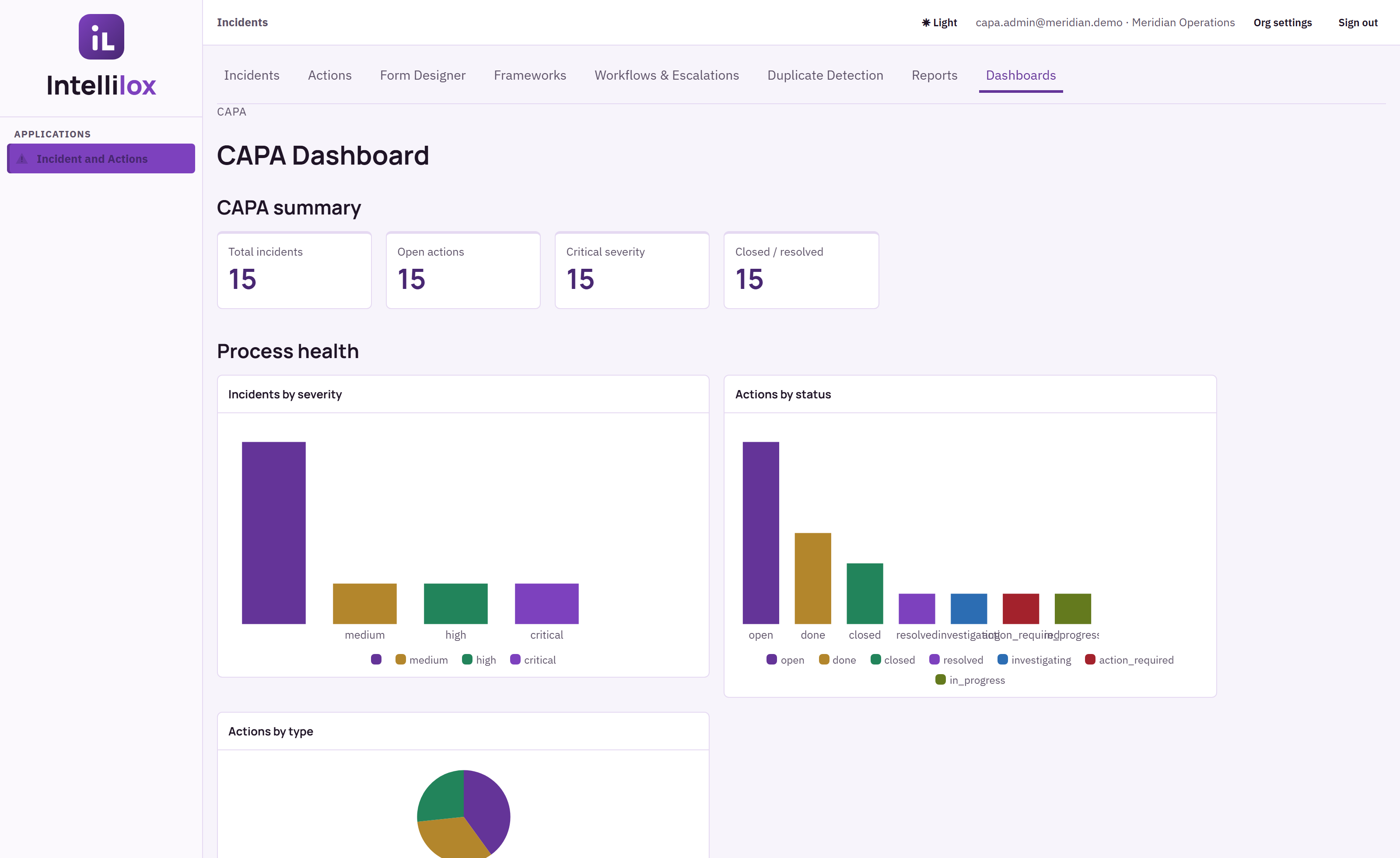
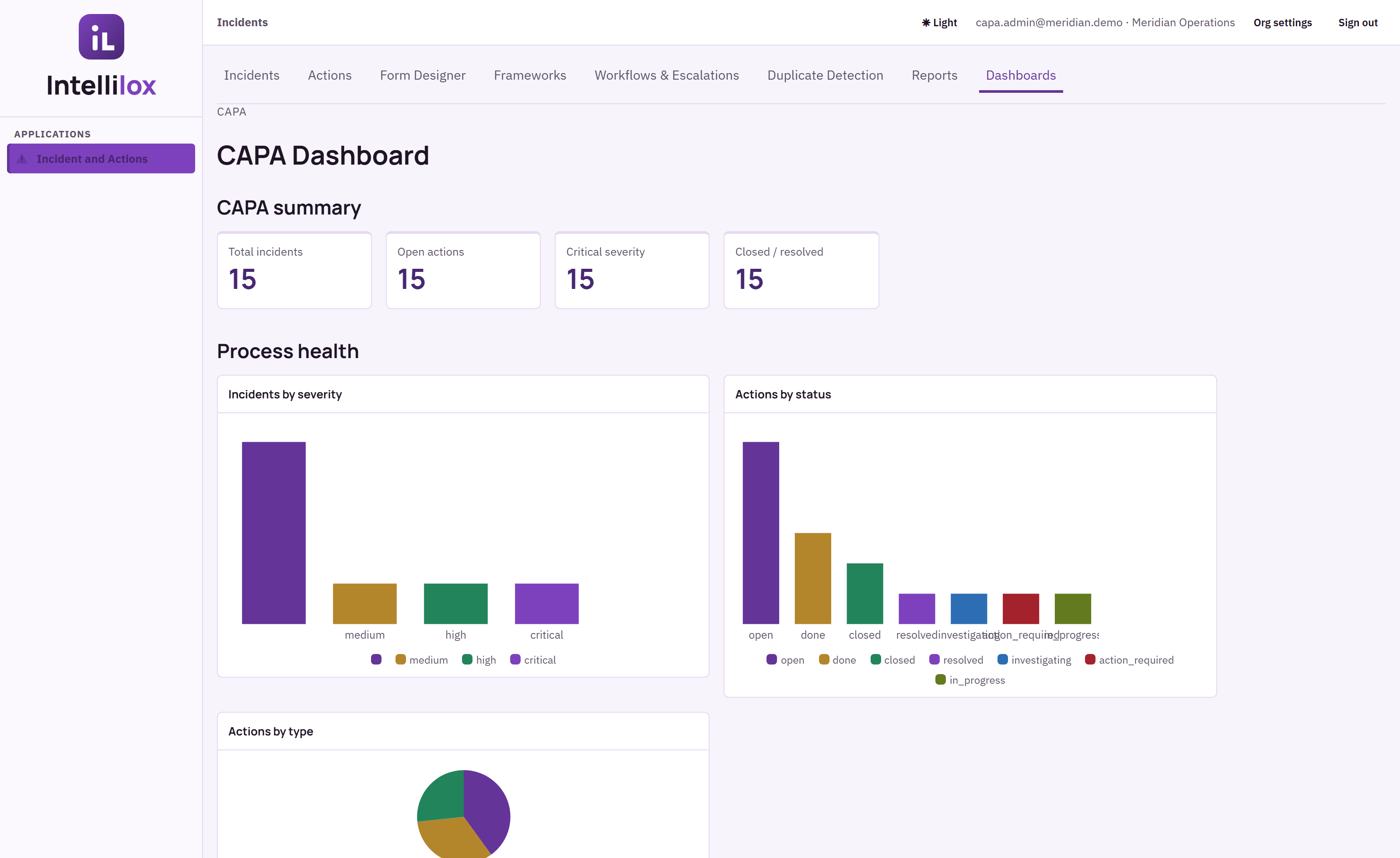
COMMAND CENTRESeverity, open actions, and process health in one view.
The CAPA dashboard is assembled in Dashboard Designer from live incident and action records — this is the operating view, not the designer.
CAPA FORMFour stages. AI on the fields that must stay accurate.
Report & Intake through Recover, Review & Close. Description and CAPA narrative fields offer an AI rewrite so the record is usable after the pressure passes.
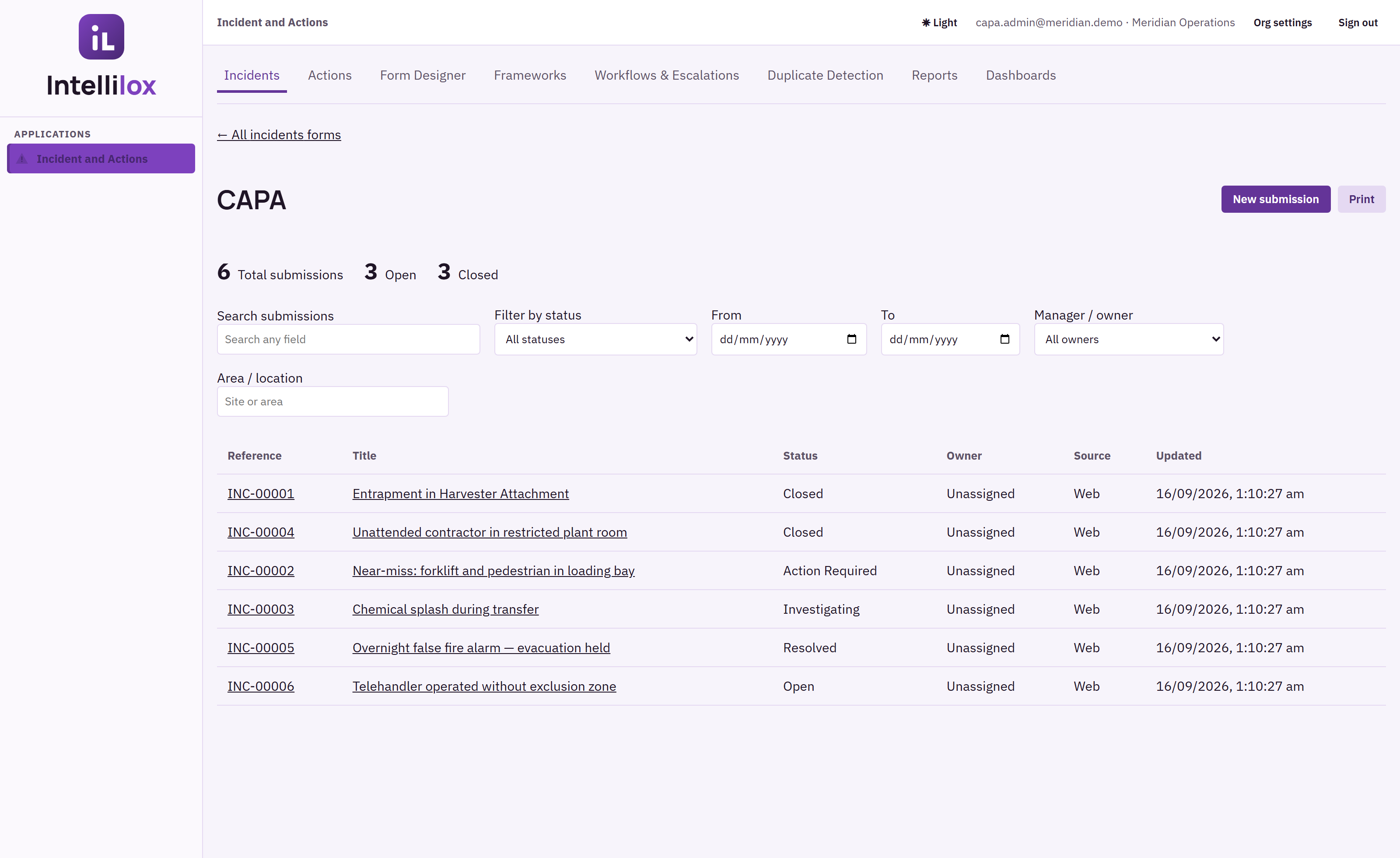
INCIDENT REGISTERFilter by status, manager, area, and date — then print.
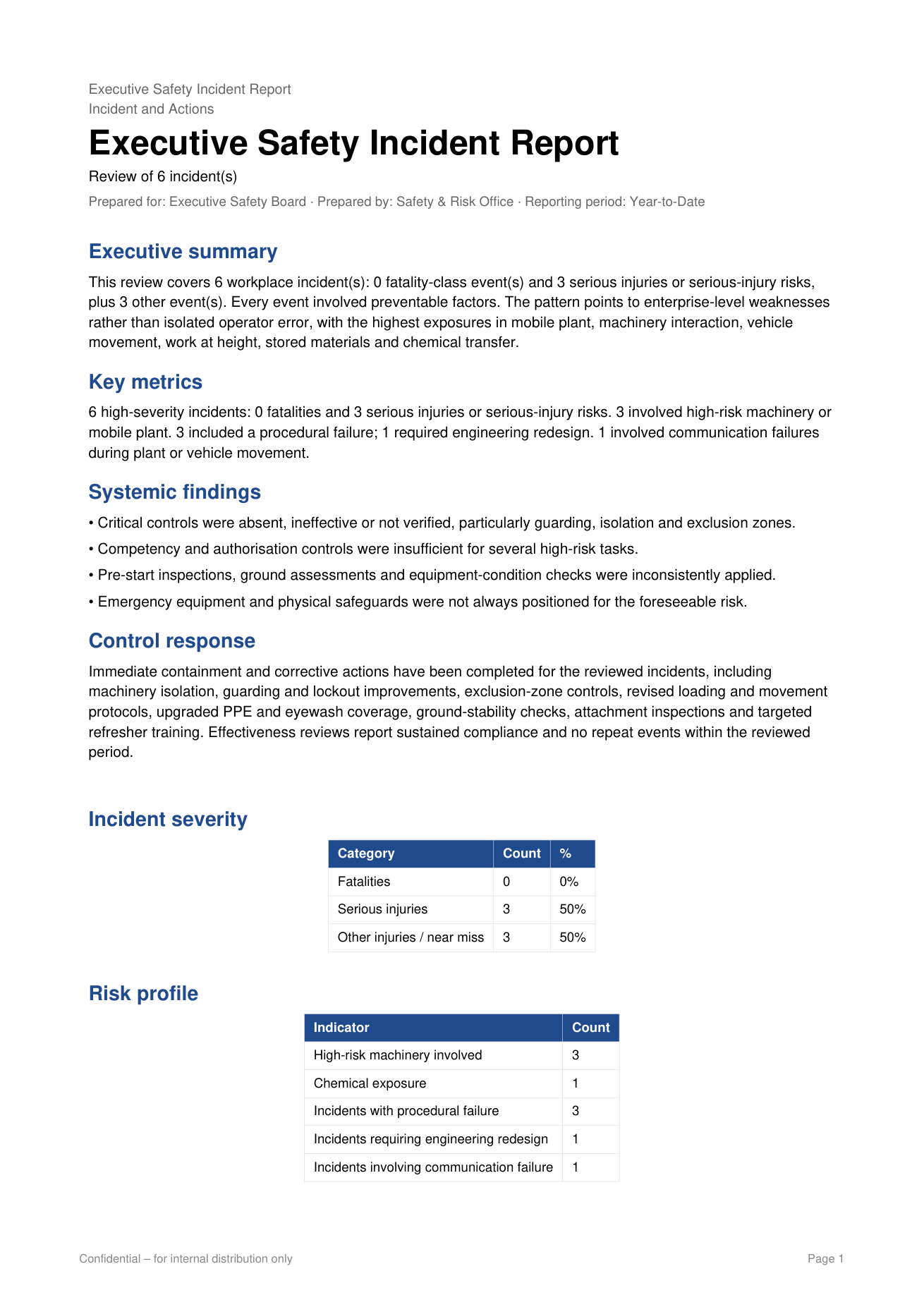
Print this list as the Executive Safety Incident Report, or open any row into the full CAPA record.
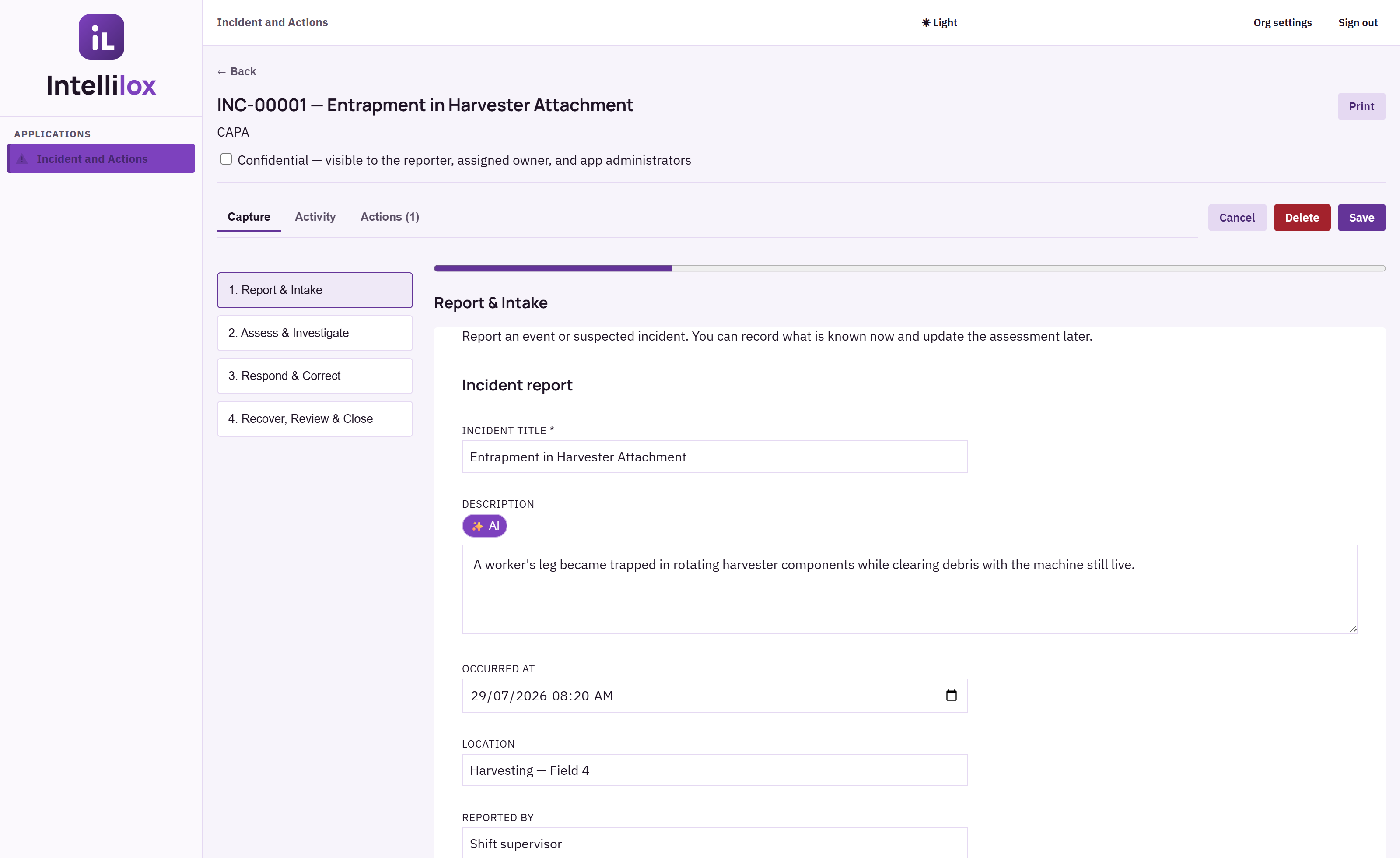
INCIDENT RECORDFacts, CAPA, activity, and linked actions on one item.
Print this item as a board-ready PDF. Confidential records stay visible only to the reporter, owner, and administrators.
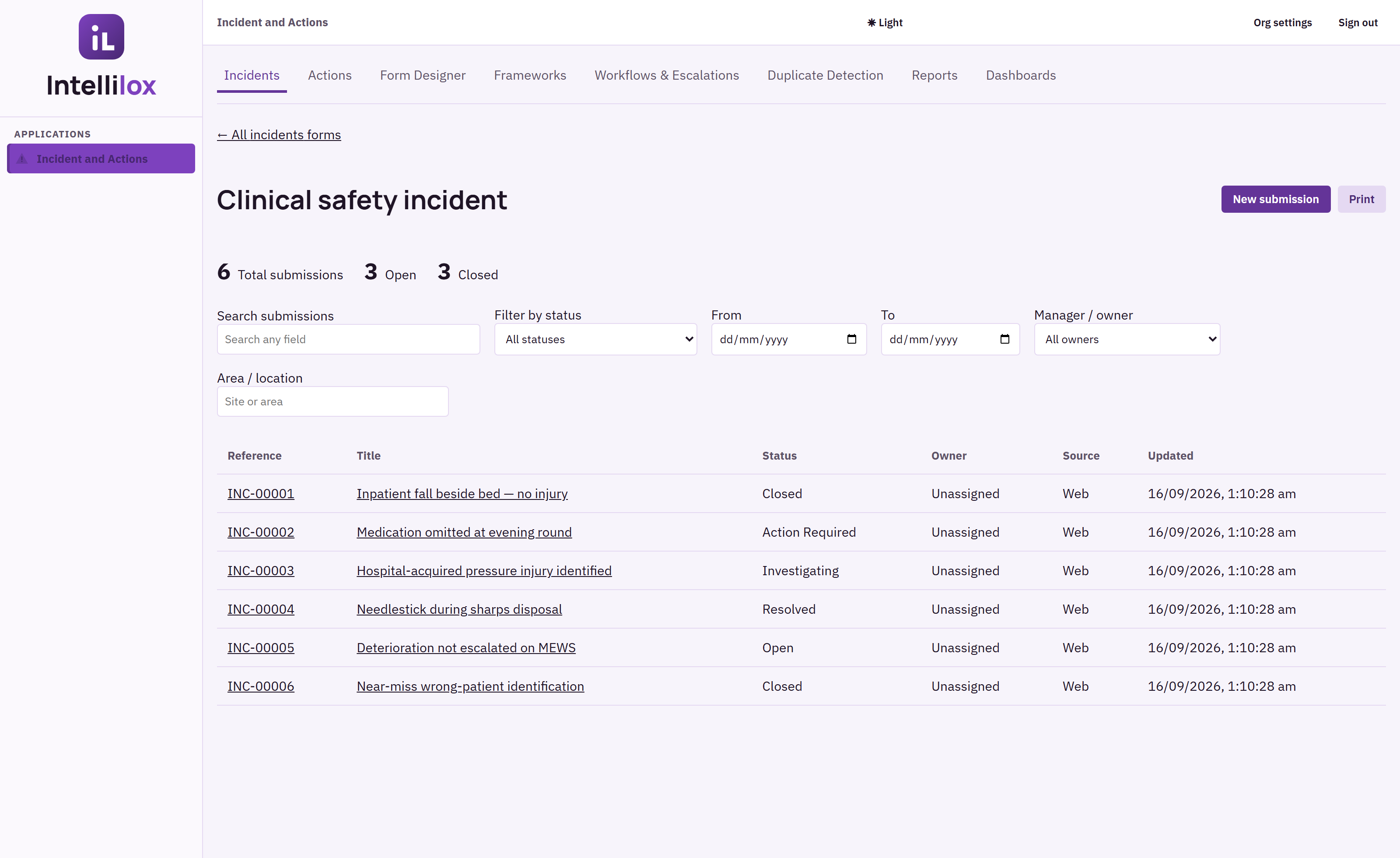
HEALTH EXAMPLEA clinical safety form published beside the default CAPA form.
Same product, different published form: department, harm level, and a de-identified patient reference.
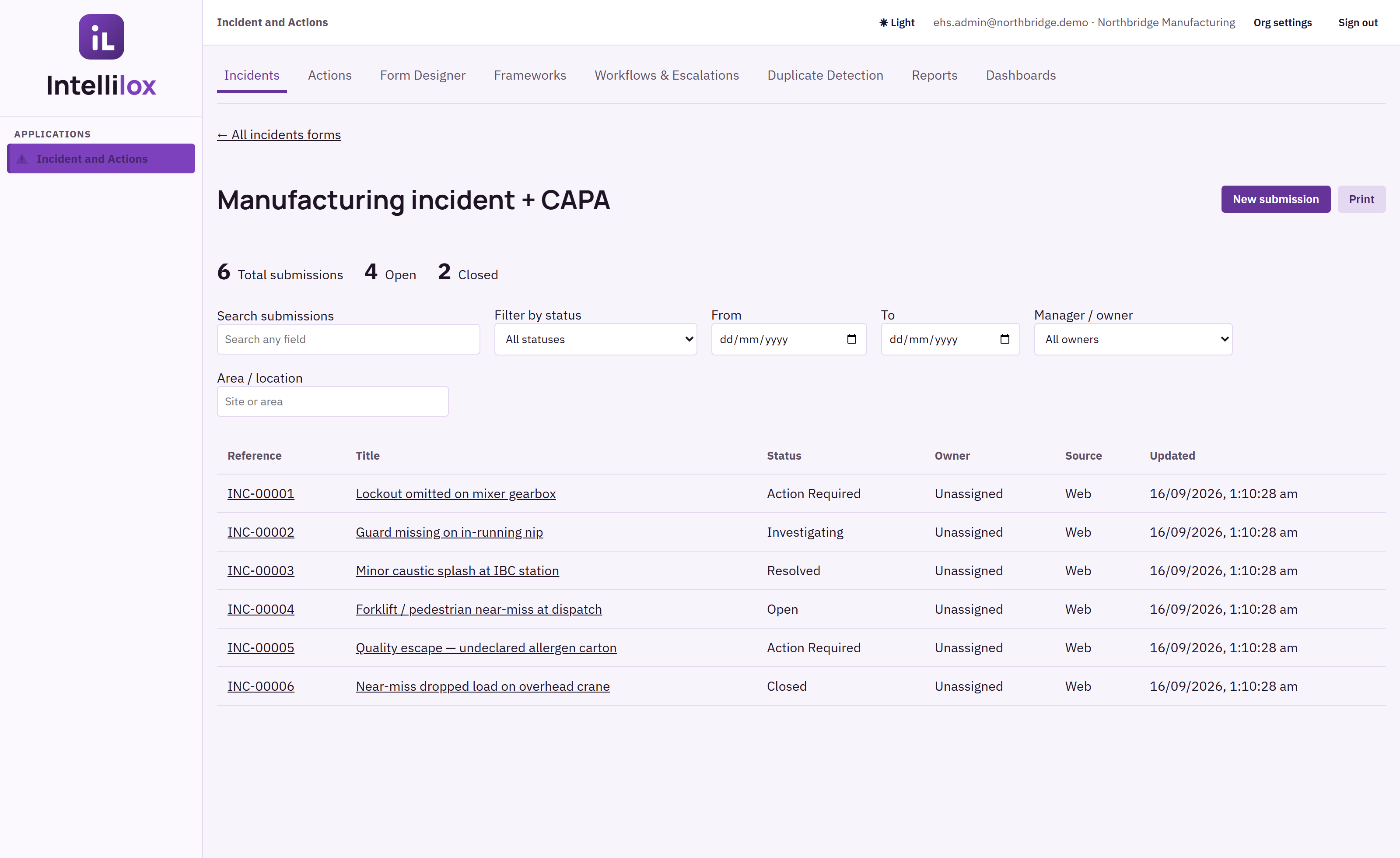
MANUFACTURING EXAMPLELOTO, guarding, chemical, and quality-escape events.
Plant, shift, equipment, and stop-work sit on the intake page so investigation starts from the right asset.
Application captures from Incident and Actions-only demonstration organisations. Screens and records depend on role, permissions, and the forms your administrators publish.
WHAT SHIPS IN THE PRODUCT
Every capability below is in Incident and Actions.
This is not a catalogue of other Intellilox applications. Frameworks, Form Designer, Workflows & Escalations, duplicate detection, Reports, and Dashboard Designer are how Incident and Actions is configured and run.
CAPA formDefault four-stage form: intake, assessment, respond & correct, recover & close — including containment, root cause, corrective and preventive action, and effectiveness review.
AI rewriteOn description and CAPA narrative fields, an in-form AI control rewrites the text for a clearer, more accurate operational record without leaving the page.
ActionsCorrective, preventive, and follow-up work with owner, due date, priority, completion evidence, and a source link back to the incident.
FrameworksDeploy a governed starting structure into Incident and Actions, name the customer form, then refine it. Installing a template does not by itself create certification.
Form DesignerMultiple active forms at once. Health, manufacturing, and construction can each have a published form beside the default CAPA form.
EscalationsWorkflows & Escalations notify owners, delay follow-up, update fields, assign work, and keep in-app deliveries on the incident timeline.
DuplicatesDuplicate detection helps stop the same event being typed twice so the register stays trustworthy.
ConfidentialMark a record confidential so only the reporter, assigned owner, and administrators can see it. Access groups further scope who sees whose work.
PrintPrint this item, or print the filtered list as the Executive Safety Incident Report / action register. Word export is available from the same screens.
MobileCapture-only mobile path so the frontline can report without waiting for a desk.
CAPA
Find the cause. Own the change.
Corrective action removes the cause of a detected problem. Preventive action reduces the chance it happens elsewhere. Both need evidence that the action was implemented and effective. In Intellilox that work lives on the incident and on linked actions — not in a separate tracker product.
The accountable work layer inside Incident and Actions.
Actions are not a second incident register. They are the focused workspace for corrective, preventive, and follow-up work raised from an incident.
One ownerClear responsibility and due date for every action.
One statusVisible progress, escalation, and overdue work.
One evidence trailImplementation notes and proof remain connected.
One source linkNavigate from the action back to the originating incident.
FRAMEWORKS + FORM DESIGNER
Start with structure. Stay in control.
Launch a framework as an operational form — not another static document. Name it for your organisation, then use Form Designer to adjust labels, required fields, conditions, attachments, and routing. We describe those authoring tools here; we do not publish their designer screens.
FRAMEWORKSTypical starting points
01
OHS incident + near missDeploy into Incident and Actions, then refine locally
Clinical or plant variantSame CAPA path with the fields your sites already use
DEPLOY
01Deploy
Select an active framework, choose Incident and Actions, and give the deployed form its customer-facing name.
02Refine
Form Designer adjusts labels, required fields, conditions, attachments, guidance, and page flow. Multiple forms can be active at once.
03Operate
Capture records, connect actions, preserve framework provenance, and surface evidence through dashboards and print.
Intellilox helps organisations operationalise and evidence their chosen frameworks. Installing a template does not create certification or guarantee compliance.
REPORTING
Print the pack the board already expects.
Report Designer is the admin layout tool. Day-to-day printing lives on Incident and Actions: print this item, or print the filtered list as the Executive Safety Incident Report. Filters for manager, area, and date range are the same ones already on the register.
Executive Safety Incident ReportYear-to-date pack from live Incident and Actions records: summary, key metrics, systemic findings, severity, and CAPA. Download a sample PDF.
DASHBOARD DESIGNER
Design the view your decisions need.
Authorised administrators assemble KPI cards, charts, and tables from native and custom fields. We do not show the designer canvas here. What you see is the operating dashboard that designers publish — the CAPA command centre from an Incident and Actions-only organisation.
Published CAPA dashboardTotal incidents, open actions, critical severity, and process-health charts. Built in Dashboard Designer; used every day as the command centre.
Built for teams that need the record to stand up after the pressure has passed
01connected incident and action history
02configurable CAPA forms and dashboards
03executive print from the live register
NEXT STEP
Start a 30-day trial of Incident and Actions.
Create an organisation, set your password, and use Incident and Actions for 30 days. Existing customers sign in at app.intellilox.com.